
Building Workflows
This guide walks you through building workflows in MIFY — from simple chains to complex multi-step pipelines with branching, human approval, and AI orchestration.
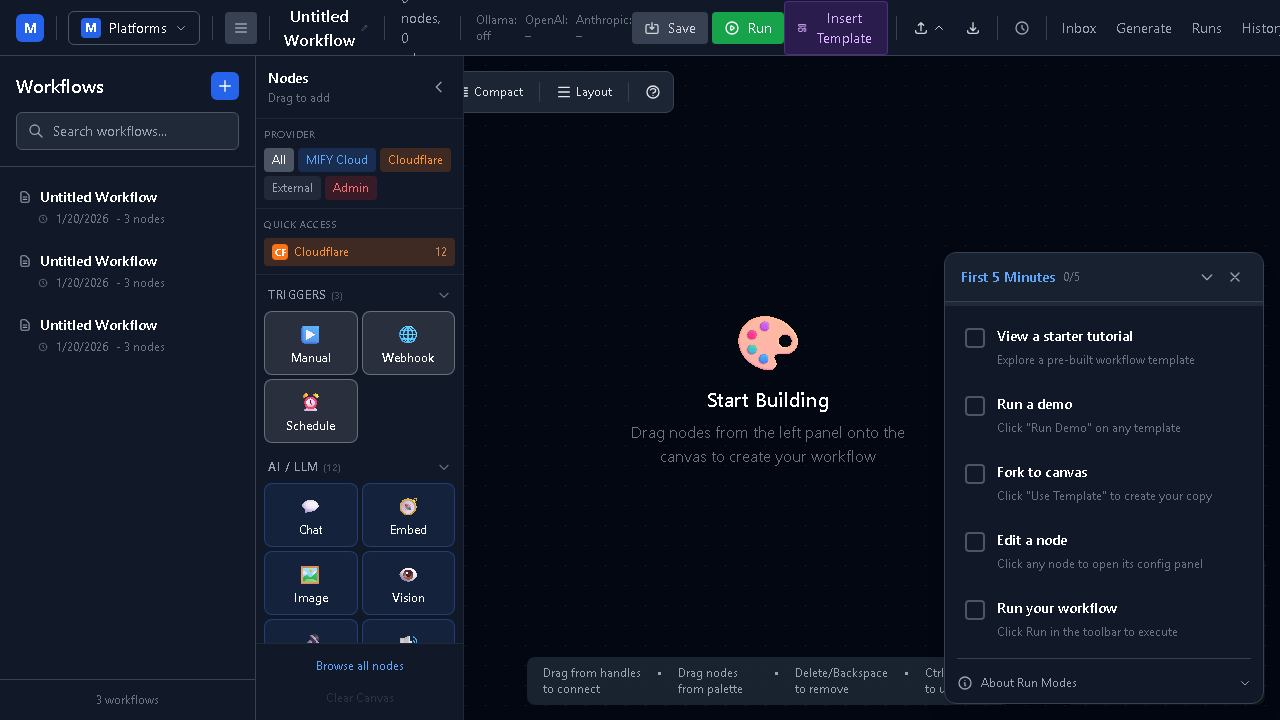
Workflow Basics
Section titled “Workflow Basics”A workflow in MIFY is a directed acyclic graph (DAG) — a series of connected steps that process data in one direction without loops.
Trigger → Node A → Node B → Node C (output) ↘ Node D ↗Every workflow has three elements:
- Trigger — how the workflow starts (manual, webhook, schedule, event, or form submission)
- Nodes — processing steps (AI calls, data transforms, logic gates, integrations)
- Edges — connections between nodes that define data flow
Node Categories
Section titled “Node Categories”MIFY provides 126 native nodes across 24 categories:
| Category | Examples | Purpose |
|---|---|---|
| LLM | Chat, Embed, Image Generate, Vision, ASR, TTS | AI model operations |
| Transform | Template, JavaScript | Data transformation |
| Logic | Route If, Route Switch, Loop Map, Sub-Workflow | Flow control |
| RAG | Ingest, Chunk, Embed, Store, Retrieve, Rerank | Retrieval-augmented generation |
| Platform | Dify, Flowise, Langflow, n8n, and 20+ more | External platform integration |
| Agent | ReAct, Multi-Agent (Plan-and-Execute, Reflection, Supervisor, Swarm), CLI Agent, Browser Use, Computer Use | AI agent orchestration |
| Safety | PII Detector, Injection Detector, Jailbreak Detector | Content protection |
| Enterprise | Email, Calendar, Notifications, Quota, Policy | Business integrations |
| Cloudflare | D1, KV, R2, Vectorize, Queues | Edge storage and compute |
| Sandbox | sandbox.exec, sandbox.plan, sandbox.session, host.apply, workspace | Isolated code execution |
Step-by-Step: Build a RAG Workflow
Section titled “Step-by-Step: Build a RAG Workflow”Let’s build a workflow that answers questions using your own documents.
1. Create the Trigger
Section titled “1. Create the Trigger”Drag a Manual Trigger onto the canvas.
2. Add Document Retrieval
Section titled “2. Add Document Retrieval”Drag a Retrieve node. Configure it:
- Knowledge Base: Select your knowledge base (create one at
/knowledgefirst) - Top K: 5 (return top 5 relevant chunks)
Connect the trigger to the Retrieve node.
3. Add the AI Response
Section titled “3. Add the AI Response”Drag a Chat node. Configure it:
- System Prompt: “Answer the user’s question based on the following context: {{context}}”
- Provider: Your preferred AI provider
- Model: Your preferred model
Connect the Retrieve node to the Chat node. The retrieved documents flow as context.
4. Run and Test
Section titled “4. Run and Test”Click Run, enter a question, and see the AI respond using your documents as context.
Templates
Section titled “Templates”MIFY includes 149 built-in templates for common patterns:
| Category | Templates | Examples |
|---|---|---|
| RAG | 9 | Document Q&A, Knowledge Base Chat |
| LLM | 12 | Text Summary, Translation, Classification |
| Logic | 17 | Conditional Routing, Batch Processing |
| Platform Demos (Track A + B) | 60+ | Flowise Import, Dify Bridge, n8n Connector, Strapi, Directus, Supabase, WordPress, Saleor, MinIO, Mautic, Authentik, Keycloak |
| Agent | 5 | Multi-Agent strategies, Research Agent |
Browse templates at /templates in the UI. Click any template to preview it, then Use Template to add it to your canvas.
Human-in-the-Loop (HITL)
Section titled “Human-in-the-Loop (HITL)”Add human approval gates to any workflow:
- Drag a Pause node between any two nodes
- When execution reaches the Pause node, it stops and waits
- A notification appears in your Inbox (
/inbox) - Review the data, then Approve or Reject
- Approved: execution continues. Rejected: execution stops.
Use HITL for:
- Reviewing AI-generated content before publishing
- Approving financial transactions
- Validating data extraction results
- Any decision that needs human judgment
Multi-Agent Strategies
Section titled “Multi-Agent Strategies”The Multi-Agent node (mify-agent-multi_agent) coordinates several agents inside a single execution. Pick a strategy when you configure the node:
| Strategy | What it does | When to use |
|---|---|---|
| Plan-and-Execute | Decomposes the goal into subtasks, then executes each sequentially | Multi-step research or planning tasks |
| Reflection | Generates an answer, then critiques and revises it in a loop | Quality-sensitive output (writing, code review) |
| Supervisor | One coordinator routes work to specialized worker agents | Tasks that need different specialist roles |
| Swarm | Peer-to-peer agent network with a shared message bus | Open-ended exploration, parallel research |
See the Multi-Agent node reference for configuration.
Versioning Your Workflows
Section titled “Versioning Your Workflows”Every published workflow has a version history at /graphs/[graphId]/versions:
- Publish — capture the current draft as a
GraphVersionsnapshot (idempotent) - Archive — archive the currently-published version
- Diff — line-level diff between any two versions (uses diff-match-patch)
- Draft from version — fork a prior version into a new draft to resurrect/edit it
Each transition is logged for audit. See Execution & Trust.
Form-Triggered Workflows
Section titled “Form-Triggered Workflows”Trigger any workflow from a multi-page form submission. Three pages back the feature:
/forms— list your forms/forms/[formId]/builder— drag-drop builder with conditional fields and multi-page navigation/forms/[formId]— public render of the submittable form
Submissions hit POST /api/forms/:id/submit, which calls the FormTriggerPlugin to start the workflow. See Franchise Operators — Embedded Widgets for the embed flow.
Realtime Collaboration
Section titled “Realtime Collaboration”Multiple users can edit a workflow at the same time. The canvas runs on Hocuspocus + Yjs:
- Each session opens a WebSocket to the Hocuspocus server
- Auth handshake uses SuperTokens — only authorized users can connect
- Live presence cursors show who else is in the workflow (with name + color)
- Edits sync in real time and are periodically saved back to the canonical
MifyGraphso versioning continues to work - Y.Doc binary state is persisted in Postgres (
GraphYjsStatetable) — connections can reattach without losing work
Powered by the @mify/collab package (W16-8).
Durable Execution + Time-Travel
Section titled “Durable Execution + Time-Travel”Switch a workflow to durable mode (in /graphs/[graphId]/settings) to run it on Temporal:
- Each node runs as a Temporal Activity — durable, replayable, horizontally scalable
- Long-running flows survive process restarts without losing progress
- Full event history captured for every run
Use the time-travel UI at /workflows/[graphId]/runs/[runId] to:
- Replay from any prior step
- Fork with overridden inputs to explore alternatives
- Inspect intermediate state at any point
The /admin/temporal/durable admin page lists all durable runs and surfaces failures for replay.
Workflow as API
Section titled “Workflow as API”Publish a workflow, get a stable HTTP endpoint with auto-generated OpenAPI. From /graphs/[graphId]/versions, the WorkflowEndpointInfo panel shows you:
- The endpoint URL (
POST /api/workflow-endpoints/:slug) - A sample
curl - Per-API-key rate-limit policy
- A link to the auto-generated OpenAPI 3.1 spec for that workflow
The same Published workflow is also exposed as:
- An MCP tool at
/api/workflow-mcp/*— any MCP client (Claude Desktop, Cursor, etc.) can list and call it - An A2A v1.0 agent at
/api/a2a-server/*— with auto-populatedAgentCard.skills - A LangGraph Agent Protocol agent at
/api/agent-protocol/*— bidirectional bridge
Execution Modes
Section titled “Execution Modes”| Mode | Use Case | Behavior |
|---|---|---|
| Experimental | Development | Minimal overhead, fast iteration |
| Audited | Compliance | Full audit trail, integrity hashing |
Importing from Other Platforms
Section titled “Importing from Other Platforms”Already using another workflow platform? Import directly:
| Platform | How |
|---|---|
| Flowise | /canvas → Import → Paste Flowise JSON |
| Dify | /canvas → Import → Paste Dify YAML |
| Langflow | /canvas → Import → Paste Langflow JSON |
| n8n | /canvas → Import → Paste n8n JSON |
MIFY maps foreign nodes to native equivalents where possible. Unmapped nodes become “opaque” nodes that delegate to the original platform.
Content Generation
Section titled “Content Generation”MIFY includes a dedicated content generation system at /content-gen:
| Path | How It Works | Best For |
|---|---|---|
| MIFY Queue | Submits ComfyUI workflows to GPU providers | High-quality image/video |
| AI Provider | Direct calls to AI providers (sync or streaming) | Text, quick image gen |
| ComfyUI Local | Runs workflows on your local ComfyUI | Custom models, local dev |
Next Steps
Section titled “Next Steps”- API Reference — Programmatic workflow management
- Troubleshooting — Common issues
- Overview — Full platform capabilities